
Campaigns overlap before you notice
Plans sit in separate decks and ad accounts, so two flights compete for the same weeks and the same audience.
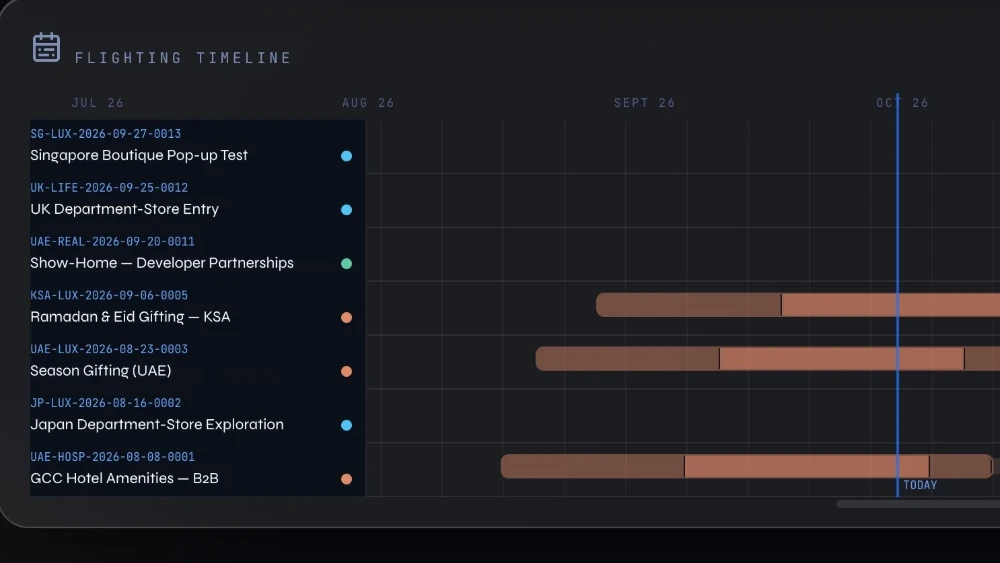
See clashes, gaps and room for the next flight while budget can still move, with every dated campaign drawn from your plans on one January to December timeline.
















Plans sit in separate decks and ad accounts, so two flights compete for the same weeks and the same audience.
Empty weeks show up in hindsight, once the moment to place a flight there has passed.
Dates follow habit or last year's calendar, so there is no clear answer when you are asked why that week.
Crowded weeks and empty stretches stand out, so you can move budget to open runway before flights collide. Every dated campaign sits on one January to December line, finished flights included.
Each bar incorporates learning, scaling and closing, with late conversions kept in view for 14 days by default, so you judge a flight once its results have settled.
Every date comes with a written reason, drawn from the campaign's objective, research and market, plus lead time for creative and tracking, so timing questions have answers.
Ready to see your own year on one timeline?
See VIMDRIVE in actionThe platform plans each campaign's dates from its research, leveraging your last 90 days of connected results, so timing starts from evidence.
Dated plans join the timeline as phased bars with nothing retyped, and your view opens on today with a count of flights about to start.
Campaigns built here utilise the start and end dates each ad platform accepts, taken from your plan, so the timeline and the account start in line.
| Topic | Traditional agency model | With VIMDRIVE |
|---|---|---|
| Year view | Plans kept in slides and spreadsheets, redrawn when dates change | One timeline drawn from your plans, with nothing retyped |
| Clashes | Overlaps tend to surface when schedules are compared late | Crowded weeks and empty stretches stand out while budget can still move |
| Timing logic | Dates are set from experience, with the reasoning held in notes | Written reasons from objective, research, market and lead time |
| Reading results | Flights are often read at a fixed reporting date, whatever phase they are in | Bars show learning, scaling and closing, with late conversions kept in view |
| Ad accounts | Dates are typically entered again in each ad platform at setup | Dates carry into Google Search, YouTube, LinkedIn and ChatGPT Ads builds |
It shows overlaps and empty weeks while budget can still move. Every dated campaign sits on one January to December line, finished flights included, so you read the year without decks or ad-account tabs. A look-ahead counts flights about to start.
They start in line with it, wherever the ad platform accepts dates. Campaigns the platform builds in your own ad accounts take start and end dates on Google Search, YouTube, LinkedIn and ChatGPT Ads. Meta takes the end date. Dates apply once, at the build, and a past start is not sent.
Because it is drawn from your plans, not typed in. There is no second schedule to drift, and dates are set in the plan. Each campaign the platform builds carries its serial number into its ad-platform name, so its bar traces back to the campaign.
Undated plans, and plans wholly outside the year, stay in sight beneath the timeline, so nothing drops out of view. Flights span 7 to 366 days. One click opens a flight's dates, phases and budget, with a link to its campaign.
See your own campaigns on one timeline in a platform demo, or map the year on a free strategy call.